Spotify Controller for Corsair Xeneon Edge

v1.3.0 LATEST
April 18, 2026

๐Ÿ”„ Spotify API Migration

  • Playlist Items Endpoint - Updated from deprecated /playlists/{id}/tracks to new /playlists/{id}/items endpoint
  • Response Field Normalization - Added backward-compatible mapping for renamed fields to maintain frontend compatibility

๐Ÿ› Bug Fixes

  • Token Reset Fix - Token reset now works via direct IPC instead of server API, fixing "Failed to fetch" errors when server is not running
  • Callback URL Consistency - Updated setup instructions to use http://127.0.0.1:3000/callback consistently
v1.2.0
December 1, 2024

โœจ New Features

  • OBS Viewer Widget - New compact overlay widget for streamers (/viewer.html)
  • OBS Integration - Designed for OBS browser sources with transparent background
  • Auto-Refresh Delay - Configurable delay (0-30s, default 5s) for iframe loading after PC startup
  • Separate Widget Colors - Independent color customization for OBS Viewer and iCUE Player
  • Background Opacity Control - Opacity slider (0-100%) for fully transparent overlays

๐ŸŽจ UI/UX Improvements

  • Vertical Sidebar Navigation - Redesigned interface with sidebar on the left
  • Wider Window - Control panel increased to 1000px width
  • Reorganized Tabs - Server Controls, iCue Widget, OBS Widget, Setup Guide
  • Contextual Setup - Widget setup instructions moved to respective tabs
  • Viewer Animations - Smooth fade in/out transitions (0.5s)
  • Auto-hide on Pause - Viewer automatically hides when music is paused
  • Dark Gradient Backgrounds - Default dark background when no song is playing
  • Volume Slider Fix - Correctly uses accent color in "No Playback" state

๐Ÿ› Bug Fixes

  • Complete App Closure - Fixed incomplete shutdown when selecting "Close Completely"
  • Server Cleanup - Server now stops properly before quitting
  • Tray Icon Cleanup - Tray icon correctly destroyed on complete shutdown
v1.1.0
November 29, 2024

โš ๏ธ Important: We've switched to PKCE authentication (no Client Secret needed anymore). If you're upgrading from v1.0.0, we recommend uninstalling the old version completely before installing v1.1.0 to ensure old tokens and settings are removed.

โœจ New Features

  • Switched to PKCE OAuth flow - no Client Secret required anymore! Setup is now much simpler
  • Added "Load More" button for playlists - replaces infinite scroll for better performance and control
  • Configurable server port - change from default 3000 if needed (Settings panel)
  • Close dialog with minimize/quit options - choose between minimizing to tray or closing completely
  • Changelog now visible in Control Panel setup guide tab

๐Ÿ› Bug Fixes

  • Fixed "Load More" button getting stuck in "Loading..." state
  • Simplified rate limit handling - now correctly displays wait time in hours/minutes/seconds
  • Fixed playlist state management when loading additional tracks
  • Fixed iframe copy button throwing "Cannot read properties of undefined" error
  • Fixed tray icon not being removed when closing app completely

๐Ÿ”ง Improvements

  • Removed Client Secret from setup process - only Client ID needed now
  • Updated setup guide to reflect PKCE authentication (no more Client Secret steps)
  • Cleaner error messages for rate limiting
  • Better handling of Spotify API rate limits
  • Code cleanup - removed unused functions and dependencies
v1.0.0 November 2024

๐ŸŽ‰ Initial Release

  • Real-time Spotify playback control
  • Cross-device playback control
  • Touch-optimized interface for Corsair Xeneon Edge
  • Playlist viewer with infinite scroll
  • Customizable accent colors
  • Album art backgrounds with blur effect
  • Auto-start options (app and server)
  • System tray integration
  • OAuth 2.0 authentication with Spotify
  • Local server with Express.js
  • Electron-based desktop application

Control Spotify from Your Display

A modern, touch-optimized Spotify controller designed specifically for Corsair Xeneon Edge displays. Control your music with style.

See It in Action

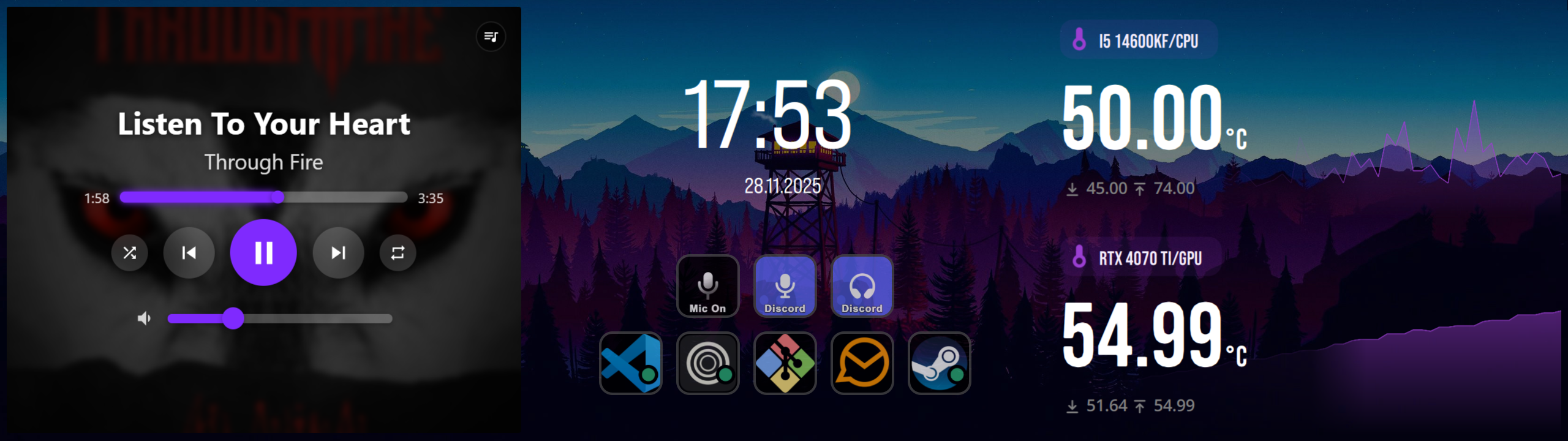
Cxeify Widget in iCUE - Playing

Widget in iCUE

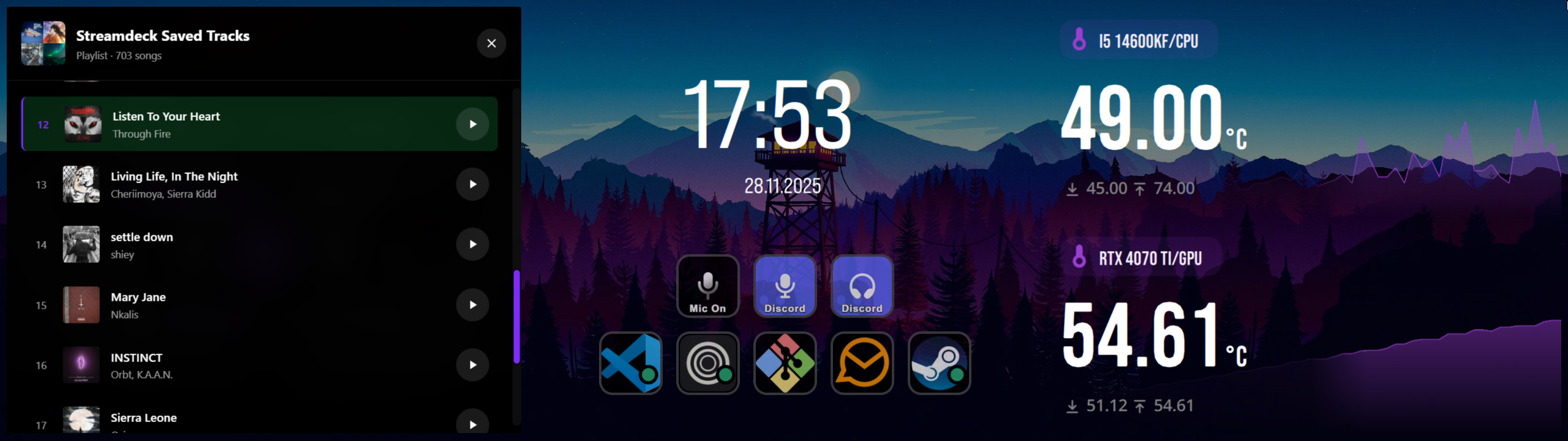
Cxeify Widget with Playlist Viewer

Playlist Viewer

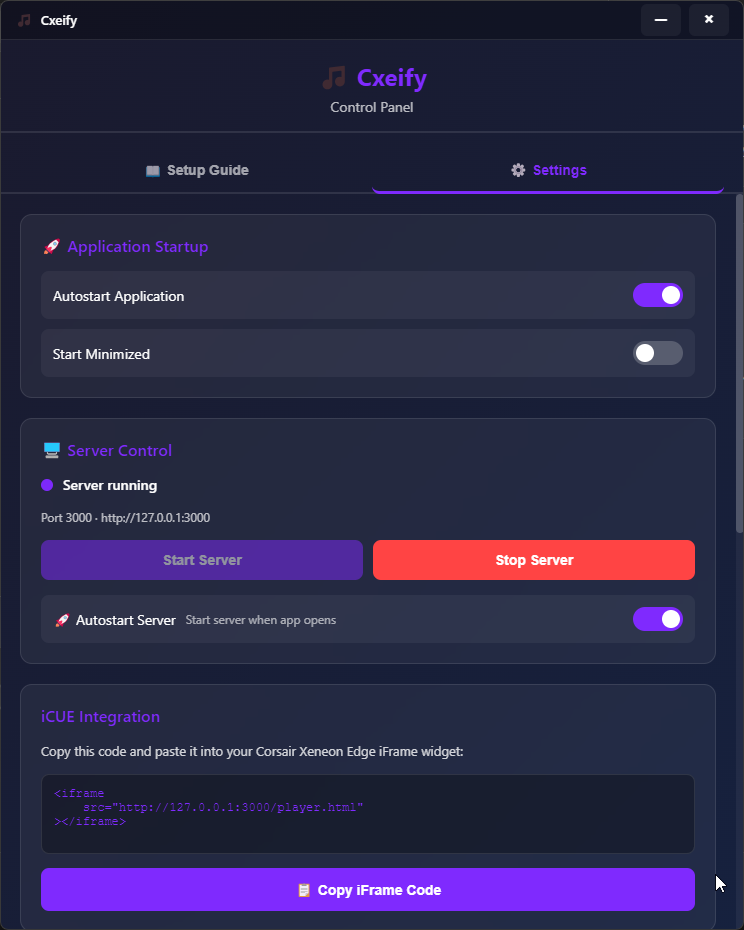
Cxeify Control Panel

Control Panel

Features

๐ŸŽต

Real-time Playback Control

Play, pause, skip tracks, adjust volume, and seek through songs with responsive controls.

๐Ÿ“ฑ

Cross-Device Control

Control Spotify playing on any device - PC, smartphone, tablet, or smart speaker.

๐ŸŽจ

Customizable Appearance

Choose your own accent color and enjoy album art backgrounds with a blurred effect.

๐Ÿ“‹

Playlist Viewer

Browse your current playlist or album with smooth lazy loading and infinite scroll.

โœ‹

Touch Optimized

Large, responsive controls designed specifically for touch displays.

๐Ÿ”„

Auto-Start Options

Launch automatically on Windows startup and start the server automatically.

๐Ÿ”€

Shuffle & Repeat

Full control over playback modes with visual indicators.

๐ŸŽฎ

iCUE Integration

Embeds seamlessly into Corsair iCUE as an iFrame widget.

๐Ÿ”’

Privacy First

All data stays on your machine. No external services, no tracking.

Built With

Electron Express.js Spotify Web API OAuth 2.0 PKCE electron-store Vanilla JavaScript